American Bald Eagle Wings Spread Design
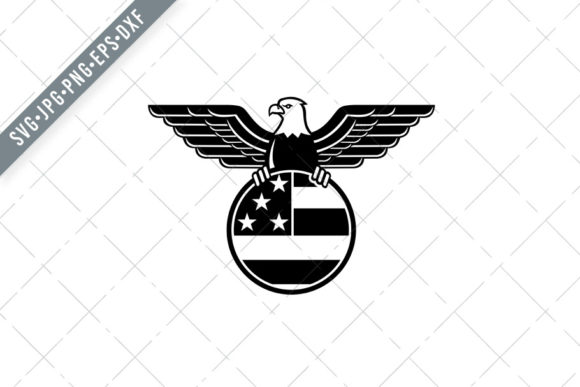
When you need a bold patriotic symbol that commands attention, few images rival the American bald eagle wings spread in full flight. This isn’t just another stock graphic. It’s a carefully crafted mascot illustration of a bald eagle with wings spread wide, clutching the stars and stripes of the American flag inside a clean circle, viewed from the front on an isolated background, and executed in a distinct retro style. Whether you’re designing for a campaign, a product line, a classroom project, or a personal celebration, having a versatile vector file set like this one can save hours of work and elevate the final result.
The collection includes SVG, PNG, DXF, EPS, and JPG formats, each prepared at a minimum of 300 dpi and at least 10 inches in size. That means you can scale the image for a business card or a billboard without losing quality. No pixelation, no re-drawing, no headaches. Below, I’ll walk through what makes this set worth your attention, where you can use it, and how to get the most out of each file type.
What the American Bald Eagle Wings Spread Brings to Your Projects
At its core, this illustration combines two enduring patriotic motifs: the bald eagle and the American flag. The eagle faces forward with wings fully extended, creating a symmetrical, powerful silhouette. Inside the circular framing, the flag wraps around the eagle’s body, reinforcing the connection between national pride and strength. The retro styling adds warmth and character, making it feel established rather than generic.
This design works especially well when you need to communicate patriotism, authority, or heritage without relying on clichés. The front-facing pose is assertive but not aggressive, and the circle keeps the composition compact and easy to place in layouts. The isolated background means you can drop it onto any surface, from a dark t-shirt to a light-colored flyer, without extra cleanup.
Why the File Formats Matter for Real-World Use
Not all projects are the same, and having multiple file formats ensures you’re never stuck converting or cleaning up a file. Here’s what each format in this download is best suited for:
- SVG (Scalable Vector Graphic) – Ideal for cutting machines like Silhouette Cameo and Cricut. Because it’s vector-based, you can resize it infinitely and the machine will follow clean lines. Great for vinyl decals, stencils, and iron-on transfers.
- PNG (300 dpi, 10+ inches) – Perfect for digital use where you need a transparent background. Use it in social media graphics, website headers, presentations, or print-on-demand mockups. The high resolution means it prints sharply at poster size.
- DXF (Drawing Exchange Format) – Another vector format that plays well with many CAD and design programs. If you use software that prefers DXF over SVG, this file saves you the conversion step.
- EPS (Encapsulated PostScript) – A standard format for professional graphic design and print production. Open it in Adobe Illustrator, CorelDRAW, or Affinity Designer and keep full editing control over paths, colors, and layers.
- JPG (High-quality raster) – When you just need a quick preview, a printable reference, or a file that any computer can open, JPG covers you. The high resolution ensures it doesn’t fall apart on larger prints.
Having all five means you can move from digital mockup to physical product without re-purchasing or re-licensing assets. That’s a time saver whether you’re fulfilling one custom order or scaling up production for a small business.
Practical Applications Across Different Environments
Let’s look at where this American bald eagle wings spread design actually fits into real workflows. I’ve broken it into categories so you can see which use cases align with your needs.
Personal and Celebration Projects
If you’re planning a birthday, retirement party, or holiday gathering with a patriotic theme, this design works beautifully on invitations, banners, cupcake toppers, and thank-you cards. The retro style adds a nostalgic feel that resonates with older generations while still feeling fresh enough for younger audiences. You can print the JPG version at home for quick items, or send the EPS to a professional printer for larger banners.
For scrapbooking and memory books, the PNG file drops right into digital layouts, or you can print it onto transfer paper and apply it to fabric pages. The circle format makes it easy to frame with embellishments like stars, stripes, or handwritten dates.
Commercial and Entrepreneurial Use
Small business owners and entrepreneurs will find this set valuable for branding merchandise. T-shirts, hoodies, tote bags, mugs, and hats all benefit from a clean, scalable vector. Because the design is already isolated and symmetrical, you can position it centered on apparel or offset for a more modern look.
Stencil makers will appreciate the SVG and DXF files. Load them into your cutting machine, choose your vinyl or stencil material, and cut a mask in minutes. Whether you’re painting signs for a local event, creating custom workwear for a team, or making limited-edition prints, the vector files give you precision without manual tracing.
Print-on-demand sellers can upload the PNG or SVG directly to platforms like Printful, Redbubble, or Teespring. The transparent background ensures the design sits cleanly on any product color, and the 300 dpi resolution meets most platform requirements without downscaling.
Educational and Institutional Settings
Teachers, librarians, and museum educators often need high-quality visuals that are copyright-safe and easy to reproduce. This illustration works well for classroom posters, civics lessons, history handouts, and event flyers. The SVG file can be projected on a smartboard without losing clarity, and the PNG can be embedded into digital worksheets or slides.
For scouting groups, veteran organizations, or community centers, the design offers a ready-made emblem for certificates, badges, newsletters, and program covers. The retro style adds a sense of tradition that suits formal ceremonies and public displays.
Digital and Marketing Content
Bloggers, publishers, and content creators who cover topics related to American history, patriotism, wildlife, or design trends can use this illustration as a featured image, social media graphic, or email header. Because it’s a vector, you can recolor elements to match your brand palette without starting from scratch.
Marketers running seasonal campaigns around Independence Day, Veterans Day, Memorial Day, or election seasons will appreciate having a file that doesn’t look like every other stock photo. The front-facing eagle and circular flag create a distinctive focal point that works well in thumbnail sizes, which is critical for engagement on mobile feeds.
Key Benefits: Usability, Efficiency, and Appearance
Beyond the obvious aesthetic appeal, this file set delivers practical advantages that affect your bottom line—whether that’s time saved, fewer design iterations, or higher-quality final products.
Usability: Each file is ready to use with minimal adjustments. The design has a transparent or isolated background depending on format, so you’re not wrestling with white boxes or messy edges. The circle framing acts as a built-in crop, meaning you don’t have to spend extra time compositing it into layouts. It’s a plug-and-play graphic that respects your deadline.
Efficiency: Having SVG, DXF, and EPS in one download eliminates the need to convert files between platforms. If you design in Illustrator but cut on a Cricut, you can use the SVG directly. If your laser cutter prefers DXF, that file is ready. One purchase, multiple workflows. This is especially valuable for creators who juggle several methods of production—digital, print, and physical.
Appearance: The retro styling is deliberate. Flat, modern vectors can feel cold or corporate, but the warm lines, slight texture, and classic proportions of this design evoke a sense of craftsmanship. It looks like something printed on a vintage poster or embroidered on a mid-century jacket. That character makes it stand out in a market flooded with generic clip art.
Realistic Examples and Observations
I’ve seen this type of design used effectively in several real scenarios. A small apparel brand created a limited-run line of t-shirts for a local Fourth of July parade. They used the SVG file to cut heat-transfer vinyl, applied it to navy and heather gray shirts, and sold out within two days. The owner noted that the symmetrical front-facing eagle was easy to position on the center chest and the circle kept the flag from feeling crowded.
Another example: a middle school history teacher used the PNG to create a large classroom poster about the symbolism of the bald eagle. She printed it at 18 by 24 inches, and the 300 dpi resolution kept the text and flag details crisp. She later used the SVG file to cut a stencil for a student project where kids painted the design on tote bags for a school fundraiser.
A freelance graphic designer I know frequently uses EPS files from sets like this when working on municipal branding projects. She appreciates that she can open the file in Illustrator, ungroup the elements, and adjust colors to match a city seal or organization logo. The front-facing eagle becomes a base that she customizes, saving her from drawing complex vector artwork from scratch.
Practical Considerations Before You Start Using the Files
Here are a few things worth keeping in mind to avoid common pitfalls and get the best results with this American bald eagle wings spread set.
- Check your software compatibility. While SVG and EPS are widely supported, some older versions of design software may handle these files differently. It’s a good practice to open the file in a trial version of your program before committing to a large run.
- Test scaling early. Because the PNG is 300 dpi at a minimum of 10 inches, you have plenty of resolution to work with. But if you plan to print at very large sizes (like a 48-inch banner), test a scaled version on paper first to ensure the retro details hold up.
- Consider color adjustments. The design uses the classic red, white, and blue palette, but if your project needs a specific brand tone, the EPS and SVG files allow for easy color editing. Keep a backup of the original in case you want to revert.
- Store files logically. With five formats, it’s easy to lose track of which version you used for which project. I recommend keeping a folder with subfolders for each format, plus a “project versions” folder where you save edited copies. This prevents you from accidentally using a low-res JPG when you meant to use the SVG.
- Respect usage limits. The set is designed for personal and commercial projects, but always check the exact license terms included in your download. Some sets restrict certain uses like reselling the raw file as a digital download or using it in trademarked branding.
Why This Design Stands Out for Creators and Professionals
There’s no shortage of eagle graphics online, and many are free or very cheap. But what separates this American bald eagle wings spread set from the noise is the combination of thoughtful composition, retro aesthetics, and serious file preparation. You’re not just getting a picture—you’re getting a production-ready asset that respects your time and tools.
The front-facing eagle with wings spread is one of the most recognizable silhouettes in American visual culture. When you combine it with the stars and stripes inside a circle, you get a design that works as a standalone emblem, a logo element, or a decorative accent. The isolated background and multiple vector formats mean you can use it across print, digital, and physical products without hitting technical barriers.
Whether you’re creating for a client, a classroom, a small business, or a personal celebration, having this file set in your toolkit means you can go from concept to finished product faster, with less friction, and with a consistent visual quality that reflects well on your work.