Secret Love Card Mockup: A Practical Evaluation for Designers
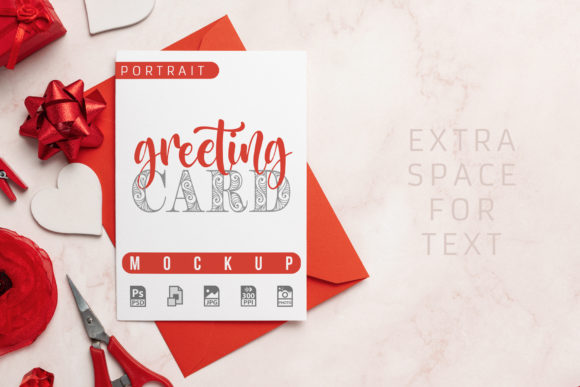
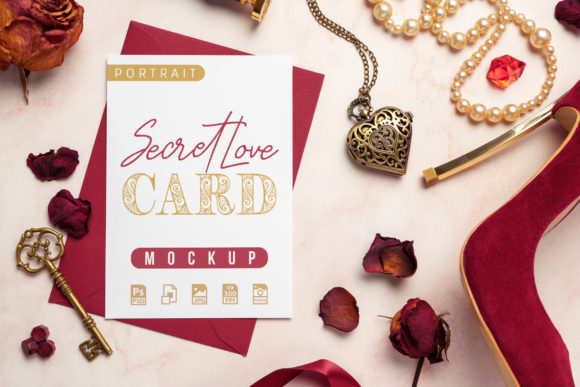
Presenting a greeting card design, illustration, or invitation in a way that resonates with clients can be challenging. A flat digital file often fails to convey the texture, atmosphere, and emotional weight of the final printed piece. The Secret Love Card Mockup offers a styled, romantic scene built around a white paper card in portrait orientation paired with a red envelope. Surrounded by vintage objects like a heart-shaped pocket watch, pearl necklace, ribbon, red gem, roses and petals, a vintage key, and a high-heeled shoe, this template provides a ready-made context for your artwork. This article evaluates the mockup objectively, helping you determine if it aligns with your presentation goals, workflow, and client expectations.
What the Secret Love Card Mockup Delivers
At its core, this mockup is a layered Photoshop template (PSD) based on a real photograph. The scene is already composed: a white card and red envelope sit among carefully arranged romantic and vintage props. The template includes a smart object layer that lets you replace the placeholder artwork on the card with your own design in just a few clicks. The final image is rendered at 3150 x 2100 pixels at 300 ppi, giving you high-resolution output suitable for portfolio display, client presentations, or social media previews. You also receive a JPG version for quick use, and three optional shadow layers that add depth and realism to the presentation.
The template is designed to be easy to use. Double-click the smart object thumbnail, paste your artwork, save, and close. The presentation updates automatically. This simplicity lowers the technical barrier, even for those who are not Photoshop power users. The shadows can be toggled on or off, giving you control over the final mood and contrast.
Why Designers and Creatives Are Interested
Several practical reasons explain the appeal of a mockup like this. First, it saves production time. Instead of staging and photographing a physical scene, you get a photorealistic environment ready to receive your work. Second, the romantic, vintage aesthetic appeals to a specific market niche: wedding invitations, anniversary cards, love notes, Valentine's Day designs, and sentimental quotes or messages. If your portfolio or client base includes any of those categories, this scene instantly communicates the right emotional tone. Third, the high resolution ensures your work is displayed with clarity, which builds credibility with clients who want to see fine details like foil stamping, embossing, or intricate illustrations.
Another reason is the "wow factor" of a styled scene. A flat mockup can feel generic. A composed environment with roses, lace, and vintage accessories suggests care and attention to detail. It signals that you understand the mood of the project. That can help differentiate your presentation from competitors who rely on plain, unadorned card mockups.
Benefits and Tradeoffs of Using This Template
Every tool has strengths and limitations. Understanding both helps you decide whether this mockup fits your workflow. Below are the key benefits and tradeoffs to consider.
Benefits
- Realistic, atmospheric presentation: The scene is based on a real photo, which means lighting, shadows, and textures already look natural. The vintage props create a cohesive romantic narrative that enhances the perceived value of your artwork.
- Ease of use: The smart object workflow is straightforward. You do not need to adjust lighting, angles, or focus. Place your design and the template handles the rest.
- Control over shadows: Having three optional shadow layers means you can customise the depth and intensity. This is useful if your artwork is lighter or darker than the placeholder, or if you want a softer or more dramatic look.
- High resolution: At 3150 x 2100 pixels at 300 ppi, the output is suitable for print portfolios and large-screen displays. Clients can zoom in to inspect your work.
- Cost-effective: Compared to hiring a photographer or styling a shoot yourself, a single template purchase offers repeatability. You can use it for multiple projects with different designs.
Tradeoffs
- Fixed scene and composition: The props and their arrangement are set. You cannot easily move the heart-shaped pocket watch or swap the roses for another prop without advanced Photoshop editing. If your project requires a minimalist or modern aesthetic, this scene may feel cluttered or mismatched.
- Limited to portrait orientation cards: The mockup is designed for portrait greeting cards. If your artwork is landscape-oriented, square, or an unusual size, it will not fit cleanly without scaling or distortion.
- Romantic, vintage style may not suit all brands: This template is strongly themed. It works beautifully for love-related designs but may feel out of place for corporate greetings, children's cards, or humorous messages.
- Static environment: Unlike some advanced mockups that allow angle changes or perspective adjustments, this one offers a single fixed viewpoint. What you see is what you get.
When This Mockup Is a Strong Fit
The Secret Love Card Mockup shines in specific scenarios. If you are a greeting card designer or illustrator whose portfolio includes romantic themes, weddings, anniversaries, or Valentine's Day collections, this template will make your work feel like part of a story. It also suits calligraphers and lettering artists who want to display handwritten quotes or love messages in a context that complements the script style. For invitation designers, the red envelope and vintage accessories reinforce a formal, heartfelt tone that aligns with classic wedding or engagement aesthetics.
Another strong use case is social media marketing. If you run an Etsy shop or an Instagram account dedicated to card design, a styled mockup image can serve as an engaging post or product listing photo. The romantic scene attracts attention and creates desire, which can lead to more clicks and conversions. The high resolution also ensures the image looks crisp on retina displays and in print catalogs.
For client presentations, this mockup helps bridge the gap between concept and reality. A client who sees a design placed in a staged scene with props is more likely to envision the final product. This can reduce back-and-forth revisions and speed up approvals, especially for clients who need to visualise the emotional impact of the card.
When Alternatives May Be Worth Considering
No single mockup works for every project. If your design style is modern, minimalist, or geometric, the vintage props in this template may compete with your artwork rather than enhance it. In that case, a clean, unadorned card mockup with a simple surface and neutral lighting would serve you better. Similarly, if you work with landscape-oriented cards, square invitations, or oversized formats, you will need a mockup that accommodates those dimensions.
If your budget is very tight, free mockup resources may meet basic needs, though they often lack the polish and resolution of premium templates. If you need multiple angles or perspectives to showcase a complete product line, you may be better served by a bundle that includes front, back, and detail views. And if you require customisation of props or background, you might explore scene-creator-style mockups where individual elements can be moved, hidden, or recoloured.
Another consideration is file format. This mockup is PSD-based, so it requires Photoshop. If you use Affinity Photo, Pixelmator, or another editor, compatibility may be limited. Check the product requirements before purchasing.
Practical Decision-Making Insights
To determine whether this mockup aligns with your goals, start by listing the projects you will present in the next six months. Are most of them romantic, sentimental, or vintage-inspired? If yes, the investment is likely worthwhile. If your range is diverse, consider whether one strong themed mockup is enough, or whether you need a more versatile template that adapts to multiple styles.
Also assess your typical output format. If you frequently share mockups on social media, the square crop-friendly composition of this scene may work well. If you need full-bleed portfolio spreads, the 3150 x 2100 pixel canvas gives you room to add your own branding or text around the mockup.
Consider the time savings. The smart object workflow means you can produce a polished presentation in under five minutes per design. For a designer preparing multiple card concepts for a client review, that efficiency adds up quickly. Compare that with the hour or more it might take to style and photograph a similar scene from scratch.
On the evaluation side, check the shadow layers carefully after inserting your artwork. If your design is very bright, the shadows may seem heavy; if it is very dark, the shadows may be less noticeable. The ability to toggle them off gives you flexibility, but you may still need to adjust levels or contrast for optimal results. This is a minor point, but it is worth testing with your actual artwork before committing to the template for a client project.
Finally, think about the story you want your mockup to tell. The Secret Love Card Mockup tells a story of romance, nostalgia, and elegance. If that story matches your brand or your client's brand, the template becomes a powerful storytelling tool. If the story does not align, the mockup may feel like a costume that does not fit.
Final Considerations
The Secret Love Card Mockup is a specialised tool rather than a general-purpose solution. It excels at presenting romantic, vintage, and sentimental card designs in a realistic, emotionally resonant environment. For designers working in wedding, anniversary, Valentine's Day, or heartfelt greeting card niches, it offers a fast, high-quality way to showcase artwork without the need for photography or styling. The smart object simplicity, three shadow layers, and high-resolution output add practical value.
At the same time, the fixed composition, portrait-only orientation, and strongly themed props mean it is not ideal for every project. Minimalist, corporate, or humorous designs may feel out of place in this scene. Designers with diverse portfolios may need to supplement this mockup with more neutral or flexible options. By weighing the benefits against the tradeoffs and aligning the template's strengths with your specific project needs, you can make an informed decision that saves time, impresses clients, and showcases your work in its best light.