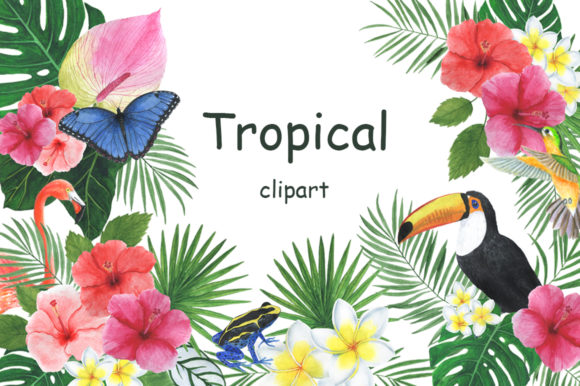
Tropical Watercolor Clipart for Creative Projects
If you have ever searched for design elements that feel both polished and organic, you have likely stumbled across the challenge of finding artwork that does not look stiff or overly digital. That is where a set like the Clipart Tropical Watercolor Illustration becomes genuinely useful. This collection offers hand-painted watercolor illustrations in both JPEG and PNG formats, giving you flexibility whether you are designing on a tablet, a laptop, or even working with a print-on-demand service. The watercolor aesthetic brings a soft, romantic feel that stands out from standard vector clipart, making it a practical choice for anyone who wants to add warmth and texture to their projects without spending hours painting from scratch.
What Makes This Collection Different
The first thing you notice when working with a watercolor illustration of tropical clipart is the depth. Unlike flat, solid-color graphics, each piece has natural variations in tone, subtle bleeding edges, and that slightly unpredictable quality that makes watercolor so appealing. This set includes 39 individual PNG files with transparent backgrounds at 300 dpi, plus the same 39 files in JPG format. That alone is worth noting: PNG files with transparency save you the headache of cutting out backgrounds later, and 300 dpi ensures your prints look crisp whether you are making business cards or large-format posters.
Beyond the individual elements, the collection also provides 20 seamless patterns in JPEG format at 300 dpi, each sized at 4500x4500 pixels. Seamless patterns are often overlooked by casual users, but they are incredibly valuable if you need custom wrapping paper, fabric prints, or digital backgrounds that repeat without visible seams. You also get four frames in both JPG and PNG, five postcard-style frames in JPG, and three pre-made compositions in JPG and PNG. That means you are not just buying random leaves and flowers—you are getting ready-to-use layouts that can be dropped directly into a greeting card or social media graphic.
Real-World Applications Across Professions
Because the set includes a mix of individual elements, patterns, frames, and compositions, it works for a surprisingly wide range of projects. Here are some realistic ways different people have used similar watercolor clipart collections:
Wedding and Event Stationery
Wedding invitations, save-the-dates, and thank-you cards benefit from the romantic, delicate watercolor style. A tropical watercolor illustration of tropical clipart with palm leaves, monstera, and soft florals works well for destination weddings or summer events. The pre-made frames and compositions save time when you need to mock up multiple options for a client, while the individual PNG files let you rearrange elements freely. Because the images are 300 dpi, you can print on matte cardstock or textured paper without losing detail.
Product Packaging and Branding
Small businesses selling candles, skincare, tea, or handmade goods often struggle to find packaging artwork that feels elevated but not overly corporate. Watercolor clipart brings a handmade, artisanal look that communicates care and quality. You can use a seamless pattern from the set as a repeating background on a box, then layer a frame and composition on the front label. Since the PNG files have transparent backgrounds, you can place them over colored packaging without ugly white boxes around your design.
Digital Scrapbooking and Planner Stickers
For hobbyists and digital planners, the clipart tropical watercolor illustration set is essentially a ready-made sticker collection. The transparent PNGs can be imported into apps like Procreate, GoodNotes, or Photoshop to decorate daily spreads, mood boards, or travel journals. The 300 dpi resolution means the elements stay sharp even when you resize them, so you can use a large palm frond as a background accent or shrink a tiny flower for a date marker.
Marketing and Social Media Content
Marketers and content creators often need fresh visuals for blog headers, Instagram posts, or promotional emails. Watercolor illustrations add a soft, inviting aesthetic that performs well in lifestyle niches, travel blogging, and wellness content. You can pull one of the compositions as a hero image, use a seamless pattern as a background for a quote graphic, or place individual leaves around product photos. Because the files come in both JPG and PNG, you can choose the format that works best for your platform without extra conversion steps.
Educational and Printable Resources
Teachers, tutors, and homeschool parents can use tropical clipart to create worksheets, flashcards, classroom decor, or reward charts. The watercolor style is visually engaging without being distracting, and the high resolution ensures that printed materials look professional. The frames in particular are useful for certificates, name tags, or lesson plan covers.
Practical Benefits of 300 DPI and Multiple Formats
One of the most common frustrations with free clipart is low resolution. You download a file that looks fine on screen, but the moment you print it at a decent size, the edges become pixelated and blurry. This set addresses that problem directly. Every single file—individual elements, patterns, frames, and compositions—is delivered at 300 dpi. For context, standard screen resolution is 72 dpi, while print-quality work typically requires 300 dpi. That means you can use these illustrations for anything from digital presentations to large printed banners without worrying about quality loss.
The inclusion of both PNG and JPG formats is another practical advantage. PNG files with transparent backgrounds are essential when you want to layer elements without a white halo. They work seamlessly in Adobe Photoshop, Illustrator, and most design apps. JPG files, on the other hand, are smaller in file size and easier to share with clients who may not have design software. You can send a JPG preview for approval and then deliver the PNG for final production. The seamless patterns in JPG format are also convenient because they are ready to use as backgrounds without any extra tiling setup.
How to Get the Most Out of Watercolor Clipart
Having a high-quality set is only half the battle. How you use it determines whether your final design looks cohesive or cluttered. Here are some practical observations based on working with watercolor illustrations:
- Layer smartly. Watercolor elements have natural texture and transparency. When layering multiple pieces, use blending modes like Multiply or Overlay in your design software to let the colors interact naturally. Avoid stacking too many dark elements on top of each other or the design may become muddy.
- Mind the background. Because these are painted illustrations, they work best on light or neutral backgrounds. A white or cream base lets the watercolor texture shine. If you place them on a busy or dark background, the soft edges may get lost.
- Resize with care. Even at 300 dpi, you should avoid scaling watercolor elements up beyond their original size. Enlarging a raster image too much will reveal pixelation. Instead, use the largest file that fits your layout or combine multiple smaller elements to create a larger composition.
- Use patterns as a foundation. The 20 seamless patterns are excellent for filling large areas like backgrounds, envelopes, or wrapping paper. Since they are 4500x4500 pixels, you can cover a substantial area without repeating too obviously. Experiment with rotating or flipping the pattern for a more organic look.
- Customize the colors. If your design calls for a specific palette, you can adjust the hue and saturation of the watercolor elements in Photoshop or similar software. Because the original files have natural color variation, they respond well to subtle adjustments. Just avoid over-saturating, which can make the watercolor texture look harsh.
What to Look for When Choosing a Watercolor Clipart Set
Not all clipart collections are created equal, and a few key factors can make or break your experience. First, check the resolution and format options. A good set will offer at least 300 dpi and include PNG files with transparent backgrounds. Second, look at the variety of elements. A set with only leaves and flowers may feel limiting, whereas one that also includes frames, compositions, and patterns gives you more room to create finished designs quickly. Third, consider the style consistency. All pieces in the Clipart Tropical Watercolor Illustration should share a similar painting technique and color palette so they look like they belong together. Finally, read the license terms if you plan to use the clipart commercially. Most premium sets allow commercial use, but it is always smart to confirm, especially if you are selling products or creating branding for clients.
Final Thoughts on Using Tropical Watercolor Clipart
The best creative tools are the ones that save you time without sacrificing quality. A watercolor illustration of tropical clipart does exactly that: it hands you a library of hand-painted elements, patterns, and ready-made compositions so you can focus on layout, messaging, and client needs rather than illustration work. Whether you are a wedding planner building a stationery suite, a small business owner designing product labels, a teacher preparing classroom materials, or a hobbyist scrapbooking vacation memories, this type of collection gives you a professional starting point. The 300 dpi resolution across all files—individual PNGs, JPGs, patterns, frames, and compositions—means you can move from digital mockups to printed final products without worrying about quality degradation. And because the watercolor style is naturally forgiving, even simple layouts feel intentional and artful. If you have been hesitating between generic vector icons and expensive custom illustration, this middle ground offers both flexibility and aesthetic depth.